
TL;DR:
- Missing tracks in DJ libraries occur when files are moved, renamed, or deleted, causing broken links that affect day-to-day use. Built-in relink tools in djay Pro, rekordbox, and Serato DJ help recover files while preserving metadata, but large-scale issues often require binary database repairs or audio fingerprinting methods like mix-id to identify missing tracks. Preventative strategies such as centralized file organization, pre-configured search folders, and consistent download habits are essential to avoid these problems altogether.
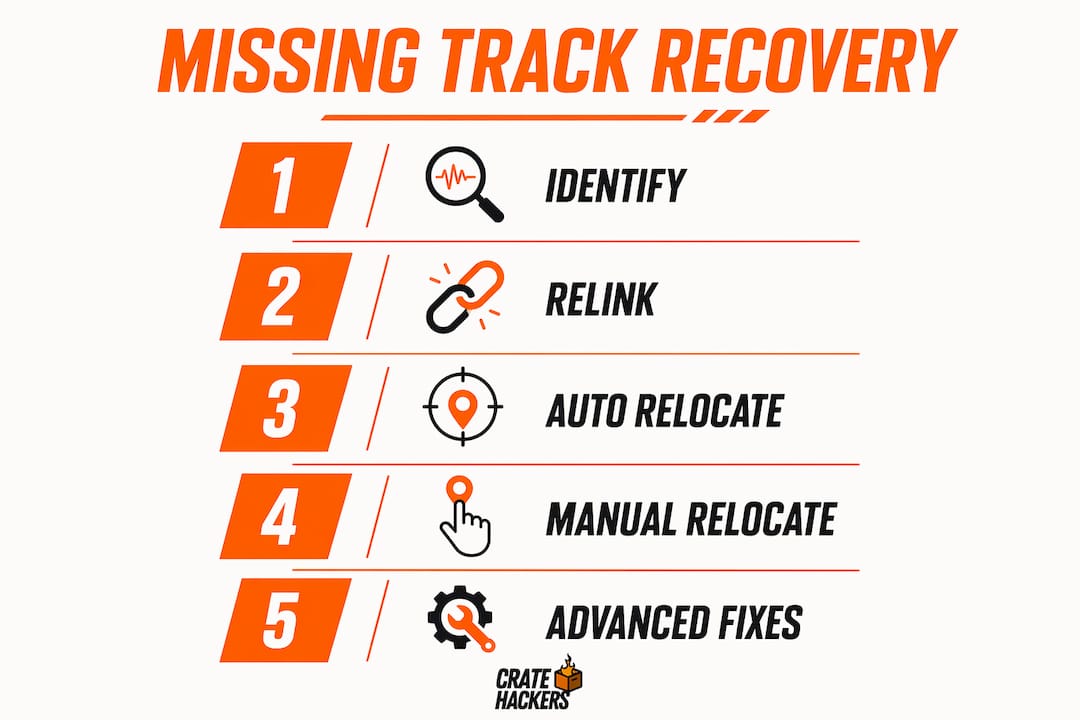
Missing tracks in a DJ library are files your software can no longer locate because the audio file has moved, been renamed, or deleted from its original path. Serato DJ, rekordbox, and djay Pro all flag these broken links differently, but every DJ faces the same panic: you open your library before a gig and half your crates are grayed out. The good news is that you can find missing tracks in your DJ library without losing your playlists, hot cues, or beat grids. This guide covers built-in relink tools, bulk repair methods for large libraries, and metadata-based recovery so you get back to prep fast.
How do DJ software tools find missing tracks in your library?
The fastest way to recover missing DJ files is to use the relink feature built into your software before touching anything else.

Each platform handles this differently, and knowing which tool to reach for saves you serious time.
djay Pro: relink without losing your metadata
djay Pro for Mac shows missing files grayed out in your library. You can relink them through the Library toolbar or by right-clicking directly on the missing file. The key advantage here is that relinking restores your playlists and metadata without any data loss. One critical detail: djay Pro tracks files moved within standard accessible folders automatically, but requires a manual relink when files move to a different drive, like an external USB or SD card. If you moved files while djay Pro was already open, restart the app first. The software needs a fresh scan to register the new paths correctly.
rekordbox: auto relocate vs. manual relocate
rekordbox gives you two options. Auto Relocate searches your configured folders automatically and reconnects missing tracks without you lifting a finger. Manual Relocate lets you point the software to a specific file when Auto Relocate cannot find it. Missing tracks in rekordbox display an exclamation mark, and you access recovery through the Missing File Manager or a right-click context menu. The catch is that Auto Relocate must be configured upfront in Preferences with your search folders set before tracks go missing. If you skip that setup step, Auto Relocate has nowhere to look. A third-party tool called rekordbox-relocator goes even further, using fuzzy metadata matching to restore hot cues and beat grids even when files have moved folders entirely.
Serato DJ: relocate lost files and its limits
Serato DJ’s “Relocate Lost Files” function works well when you have a handful of missing tracks. You drag the folder containing your files into the Relocate panel and Serato scans for matches. For most mobile DJs dealing with a few dozen broken links, this is enough. The problem shows up at scale.
| Software | Missing track indicator | Recovery method | Best for |
|---|---|---|---|
| djay Pro | Grayed out file | Relink tool (toolbar or right-click) | Small to mid-size libraries |
| rekordbox | Exclamation mark | Auto Relocate + Manual Relocate | Mid to large libraries |
| Serato DJ | Red triangle or missing icon | Relocate Lost Files panel | Small libraries; bulk repair for large |
Pro Tip: Always restart your DJ software after moving files, even if the software was closed during the move. A fresh launch forces a full path rescan and prevents ghost entries from persisting in your library.
What advanced methods fix large-scale missing track libraries?
When you have tens of thousands of broken links in Serato DJ, the GUI tool is not built for that job. Bulk repairs require direct binary database path rewriting to fix the library at scale. This is where most DJs get stuck, and where understanding the database structure pays off.
Serato DJ stores its library in a proprietary TLV (Tag-Length-Value) binary format. Every track entry contains a "pfil` tag that holds the file path. When you move your entire music folder to a new drive or rename a parent directory, every single path in that database breaks simultaneously.
Here is the process for a Python-based bulk repair:
- Back up your Serato library folder first. The default location on Mac is
~/Music/_Serato_. On Windows it lives inMy Music_Serato_. Copy the entire folder before touching anything. - Parse the binary database file (
database V2) to extract allpfiltag entries and their byte positions. - Rewrite the old path prefix with the new one across every affected entry. This is the step most scripts get wrong.
- Update both the
pfiltag length and its parentotrkrecord length field. Serato’s database requires that these two length values stay in sync. If you only update the path string without recalculating the byte lengths, Serato will fail to parse the database and your entire library disappears. - Update your crate files alongside the main database. Serato’s crate files contain their own path records encoded separately. A bulk fix that ignores crates leaves your crate organization broken even after the main library recovers.
- Delete or flag entries where the new path still does not resolve to a real file. Leaving unresolvable entries in the database creates persistent red triangles that clutter your library.
“The most common mistake in bulk Serato repairs is treating it as a simple find-and-replace. The binary structure demands precise length recalculation at every level. Skip that step and you trade broken paths for a corrupt database.”
This approach is not for everyone. If Python scripts feel out of reach, consider hiring a developer for a one-time fix or restructuring your folder system before the next large import. Either way, understanding Serato’s TLV binary structure is what separates a clean recovery from a catastrophic data loss.
How can metadata and fingerprinting tools identify missing songs?
Sometimes you know a track is missing but you cannot remember the artist or title. That is where audio fingerprinting tools become your best recovery asset.
A tool called mix-id uses the Shazam API to fingerprint audio segments from recorded mixes. It deduplicates matches and outputs full tracklists in TXT, CUE, and JSON formats. Feed it a recorded set and it generates every track name and artist in sequence. That list becomes your shopping guide for re-downloading or re-purchasing lost files.
Here is how to use this approach effectively:
- Run mix-id against your recorded sets stored on SoundCloud, Mixcloud, or YouTube. These platforms often hold mixes you played years ago, giving you a historical record of tracks you once owned.
- Cross-reference the output against your current library using artist and title metadata. Any track that appears in the fingerprint output but not in your library is a confirmed missing file.
- Use the CUE file output to reconstruct the exact sequence and timing of your original set. This is useful for rebuilding themed crates from scratch.
- Check Beatport download history if you suspect tracks were lost there. Beatport tracks go missing when users click “open” instead of “save” during download, placing files in temporary browser cache folders that clear automatically. Beatport support can reset these files if you contact them promptly.
Pro Tip: Do not rely on a single source for fingerprinting. Run mix-id against recordings from SoundCloud, Mixcloud, and YouTube separately. Each platform may have different recordings of the same set, and cross-referencing all three catches tracks that a single source misses.
What preventative strategies stop tracks from going missing?
Recovery is reactive. Prevention is the move that saves you hours before every gig.
The root cause of most missing track problems is inconsistent file organization. Tracks end up in downloads folders, desktop dumps, or temporary browser caches. When those locations change or clear, your library breaks. Fixing the structure once protects you permanently.
- Centralize everything into one music folder with a consistent subfolder structure by genre, year, or source. Never let tracks live in your Downloads folder long-term. Move them to your permanent library folder immediately after download.
- Configure rekordbox’s Auto Relocate search folders before you need them. Pre-configuring these folders means rekordbox can find relocated tracks automatically without you manually pointing to each file.
- Save Beatport downloads explicitly using “Save As” rather than “Open.” This single habit prevents the most common source of lost Beatport tracks.
- Back up your entire DJ library folder including the software database files, not just the audio. For Serato, that means backing up
_Serato_. For rekordbox, export your library XML regularly. For djay Pro, back up the app’s library database alongside your audio files. - Document file moves. When you reorganize your folder structure, keep a simple text log of what moved where. If tracks go missing after a reorganization, that log tells you exactly where to point the relink tool.
For a deeper look at folder structure best practices, the guide on organizing DJ music on Windows covers a proven system that keeps libraries clean across software platforms.
The DJ who manages music files proactively spends five minutes after every download session. The DJ who skips it spends two hours before a gig in panic mode.
Key takeaways
Recovering missing DJ tracks requires matching the right method to the scale of the problem: built-in relink tools for small libraries, binary database repair for large ones, and metadata fingerprinting for unidentified losses.
| Point | Details |
|---|---|
| Use built-in relink tools first | djay Pro, rekordbox, and Serato DJ all have native recovery features that preserve metadata and playlists. |
| Bulk Serato repairs need binary editing | Updating path strings alone breaks the database; both pfil and otrk length fields must be recalculated. |
| Audio fingerprinting recovers track identity | Tools like mix-id generate full tracklists from recorded mixes to identify and re-source missing files. |
| Prevention beats recovery every time | Centralizing files, configuring Auto Relocate, and saving downloads correctly eliminates most missing track causes. |
| Crate files need updating too | In Serato, bulk path fixes must include crate file updates or your crate organization stays broken. |
The real cost of a disorganized library
Here is what I have seen over and over again working with DJ libraries of every size: the missing track problem is almost never a software bug. It is a folder discipline problem that compounds over years until it becomes a crisis.
Most DJs I talk to have music scattered across three drives, two laptops, a downloads folder, and a desktop. Every time they upgrade hardware or reorganize, another batch of tracks goes dark. The software gets blamed, but the real issue is that there was never a single source of truth for where the music lives.
The built-in relink tools in rekordbox and djay Pro are genuinely good for day-to-day recovery. Use them. But if you are staring at thousands of broken links in Serato, the GUI tool is not going to save you. That is a database surgery job, and treating it as anything less leads to partial fixes that leave ghost entries everywhere.
What I find most underused is the metadata fingerprinting approach. DJs who have been playing for ten or fifteen years often have recorded sets that predate their current library. Those recordings are a gold mine. Running mix-id against old SoundCloud mixes has helped DJs reconstruct entire crates they thought were gone permanently.
The library is your instrument. Treat it with the same discipline you bring to your technique.
— Dominick
Take control of your library with Cratehackers

Missing tracks slow you down. Cratehackers is built to fix that. The platform scans your entire music collection, detects duplicate files, and matches your library against Spotify, Apple Music, and Tidal playlists so you always know what you have and what you are missing. It exports clean, performance-ready crates directly to Serato, rekordbox, and Virtual DJ, so your library stays organized across every platform you use. Stop spending gig prep time hunting for broken links. Start managing your library with Cratehackers and get back to doing what you do best.
FAQ
How do I find missing tracks in Serato DJ?
Use Serato DJ’s “Relocate Lost Files” panel by dragging your music folder into it. For large libraries with thousands of broken links, a Python-based binary database repair that updates both path strings and record length fields is required.
Why does rekordbox show an exclamation mark on tracks?
An exclamation mark in rekordbox means the software cannot find the audio file at its stored path. Use the Missing File Manager or right-click the track and select Relocate to reconnect it.
Can I recover missing tracks without losing hot cues and beat grids?
Yes. Both djay Pro’s Relink tool and rekordbox’s Relocate function restore metadata including hot cues and beat grids. The rekordbox-relocator tool uses fuzzy metadata matching to preserve performance data even when files have moved folders.
What causes Beatport tracks to go missing from my library?
Beatport tracks disappear when downloaded using “open” instead of “save,” placing files in temporary browser cache folders that clear automatically. Always use “Save As” and store files directly in your permanent music folder.
How do I identify tracks from old mixes I no longer have?
Use a fingerprinting tool like mix-id, which uses the Shazam API to generate a full tracklist from any recorded mix. It outputs TXT, CUE, and JSON formats you can cross-reference against your current library to identify what needs to be re-sourced.